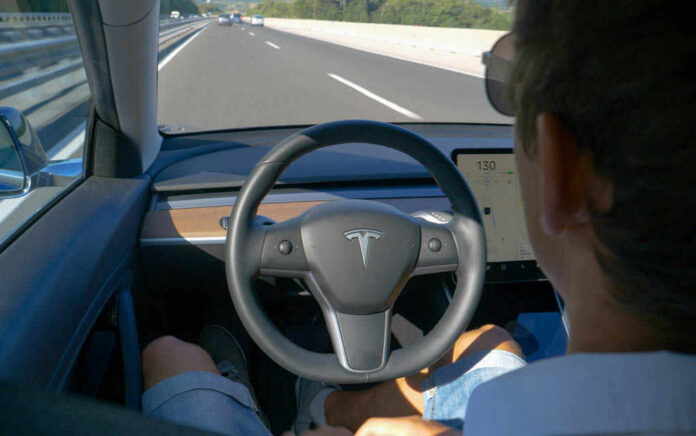
Modern in-car touchscreens are not just a cosmetic design choice; the best evidence now shows they materially degrade driving performance in ways that rival other well-established forms of distraction.
Key Points
- Controlled studies consistently find that visual–manual touchscreen use increases lane drift, task time, and reaction delays compared with physical buttons and baseline driving.
- Infotainment systems routinely occupy drivers’ eyes and minds for tens of seconds at a time, a distance measured in hundreds of meters travelled “blind.”
- Nearly all new vehicles now rely on one or more touchscreens, yet regulation lags far behind the technology and focuses mainly on phones, not built‑in interfaces.
- A small but meaningful body of counter‑evidence suggests that good design and training can mitigate, but not erase, the inherent risks of screen‑centric controls.
From “Convenience Feature” to Safety-Critical Interface
The core problem with automotive touchscreens is straightforward: they turn what used to be tactile, glance‑level tasks into visually guided, menu‑driven interactions. That shifts the human–machine interface from the fingers to the eyes, and from muscle memory to problem‑solving. When the environment is a moving vehicle rather than a living room, that change has consequences.
The recent simulator work from the University of Washington and Toyota Research Institute is emblematic. In that study, drivers using in‑dash touchscreens drifted side‑to‑side in their lane 42% more often than during baseline driving. Accuracy and speed on the touchscreen itself fell by about 58% compared with non‑driving conditions, and degraded further under high cognitive load. In other words, the moment you combine driving with screen interaction, both tasks suffer: vehicle control becomes less precise, and the interface gets harder to use.
Those findings align with broader distraction research. The AAA Foundation’s infotainment work, conducted with University of Utah researchers, showed that drivers using in‑vehicle technologies were visually and mentally distracted for more than 40 seconds when programming navigation or sending a message. At modest speeds, that is the equivalent of travelling the length of four football fields with attention substantially diverted from the road. This is not a marginal delay; it is a structural mismatch between task demands and safe driving.
What the Numbers Say About Screen-Based Driving
If you strip away the marketing language and look at metrics, three patterns recur across studies of touchscreens, infotainment systems, and related in‑vehicle interfaces.
First, visual–manual interaction substantially increases eyes‑off‑road time. The AAA work quantified more than 40 seconds for navigation entry tasks. NHTSA’s own framing of texting underscores how dangerous that magnitude is: five seconds of eyes‑off‑road at 55 mph equals the length of a football field. The infotainment numbers are several times that duration. Even when the driver’s hands remain nominally on the wheel, attention is elsewhere.
Second, lane keeping and lateral control degrade when drivers are engaged with complex interfaces. The University of Washington simulator data found more frequent lateral drift and more time outside the lane while users interacted with touchscreens. Reviews of portable electronic device distraction show similar effects for other visual–manual tasks like destination entry and text messaging, which are associated with increased lane deviations and delayed hazard detection.
Third, reaction time slows. Broader distraction literature has long documented that mobile phone use and text messaging delay responses to events in the driving environment. While the most dramatic touch‑related reaction‑time claims circulating in popular videos are not yet backed by named peer‑reviewed sources, the underlying mechanism is identical: visual load plus cognitive load produces slower response and poorer decision‑making.
Buttons Versus Screens: Why Physical Controls Still Matter
The debate over touchscreens cannot be separated from the long history of “buttons versus screens” in vehicles. Tactile controls—knobs, switches, stalks—are discoverable by feel. After minimal exposure, drivers can set the fan speed, change the station, or toggle headlights without shifting their gaze away from the forward roadway. The control loop involves proprioception and muscle memory more than vision.
When those functions move into a touchscreen, several things change. The control surface becomes flat and visually encoded; the driver must look to see both what to touch and where a given function resides within a nested menu. That introduces search time and precision tapping, and it removes the tactile confirmation that a knob has turned or a switch has latched into place. Studies comparing visual–manual with auditory–speech input modalities for in‑vehicle information systems have found that visual–manual tasks impose significantly greater distraction by most metrics. Navigation and music selection, in particular, generate higher cognitive and visual load.
This is why Swedish and European comparative tests, even when accessed chiefly through secondary reports, are so important. They consistently show that the very same task—turning on a seat heater or adjusting temperature—takes roughly twice as long, or more, on a touchscreen than with physical controls, even for drivers already familiar with their cars. The added time spent looking down translates directly into distance travelled without effective monitoring of the road ahead.
What Counter-Evidence Really Says
It would be easy—and wrong—to treat touchscreens as universally worse in every configuration. The University of Iowa driving study introduces nuance. In that simulator comparison of traditional versus large touchscreen displays, researchers found that large screens were associated with fewer glances, but slightly longer average glance duration. Crucially, they reported no statistically significant differences in total glance duration, lane position variability, or lane departures between the two conditions. Drivers also did not report higher perceived workload with the larger touchscreens.
These results suggest that a well‑designed touchscreen, integrated thoughtfully into the driving task, need not catastrophically degrade core control metrics. A single larger glance to a consolidated interface may be less disruptive than multiple shorter glances scattered across buttons and sub‑displays. That does not make screens benign, but it undercuts the claim that screen size alone inevitably increases distraction.
Training also appears to matter. Experimental work on short, instructor‑led pre‑drive training for touchscreen use indicates that when drivers know where functions are and how to access them efficiently, some distraction metrics improve. Familiarity reduces search time; fewer menu layers and clearer iconography trim visual demand. In practical terms, a driver who can start a defroster with one glance and one tap is in a better position than one scrolling through an unfamiliar interface mid‑curve.
The Double Standard: Phones Banned, Screens Embraced
Despite this nuance, the regulatory landscape treats touchscreens far more gently than it treats portable devices. NHTSA defines distracted driving broadly, covering “fiddling with the stereo, entertainment or navigation system,” along with phone use and other behaviors. Yet binding rules and enforcement have focused almost exclusively on texting and handheld phones. Many jurisdictions ban phone use outright, even when the device is in a fixed mount, on the logic that applications and notifications create unpredictable distractions.
Infotainment systems, by contrast, are presumed controllable because they are integrated into the vehicle’s architecture. That distinction is eroding. Modern platforms increasingly mirror smartphone apps—streaming, video conferencing, social media—sometimes gated nominally behind “park‑only” restrictions. At the same time, the basic driving‑related functions of the car, from climate control to wipers, have migrated onto the same surface. The result is a single, failure‑prone interface that now carries both convenience apps and safety‑critical controls.
International guidance attempts to rein in the worst excesses. Transport Canada’s guidelines, for example, explicitly aim to limit distraction from visual displays, recommending task and interface designs that constrain glance duration and do not overburden drivers. NHTSA issued voluntary guidance in 2013 suggesting that individual tasks should take no more than 12 seconds, with glance durations under two seconds. But “voluntary” means precisely that: manufacturers can ignore these standards without consequence.
Why Industry Keeps Choosing Screens
Given the accumulating evidence of risk, the persistence of screen‑heavy interiors demands explanation. Cost and design incentives provide it. Touchscreens are cheaper to produce and easier to update than arrays of mechanical switches. A single display can serve multiple markets, languages, and feature sets simply by loading different software. Minimalist dashboards photograph well and align with consumer electronics aesthetics that buyers have come to expect.
From a pure engineering standpoint, centralizing functions in software offers flexibility: OTA updates can add features, change layouts, or patch bugs years after a car leaves the factory. But the safety calculus is largely externalized to the driver. Each additional layer of functionality must be navigated in real time, often while the vehicle is moving. Survey work and complaint data now show that touchscreens top lists of new‑car owner frustrations. Safety advocates argue, with increasing justification, that this frustration is a proxy for poorly designed, attention‑hungry interfaces.
Some manufacturers and organizations are beginning to respond. Research highlighting the distraction costs of screen‑only interiors has already influenced European safety ratings, with Euro NCAP moving to penalize cars that lack physical controls for essential functions. Designers are exploring hybrid approaches—retaining hard keys for core tasks while relegating configuration and infrequent functions to the screen. That direction aligns closely with what safety researchers have been recommending for years.
Where the Evidence Leads: Practical Implications for Drivers and Regulators
Taken together, the current evidence base supports a clear position. Visual–manual touchscreens, as typically implemented in modern vehicles, impose distraction loads that meaningfully degrade driving performance, particularly for complex tasks like navigation entry and app selection. They share mechanisms with mobile phone and PED distraction—eyes diverted, hands occupied, cognition overloaded—and produce comparable patterns of drift, delayed reaction, and missed hazards.
Counter‑evidence suggests that good design, consolidation, and training can reduce the magnitude of those effects, but not eliminate them entirely. The safest implementations are those that minimize task time, preserve physical controls for time‑critical functions, and support operation with minimal visual search. Framed like this, the question is not whether touchscreens can exist in cars, but which functions belong on them while the vehicle is in motion.
For regulators, the gap lies between guidance and enforceable standards. If a two‑second glance doubles crash risk, then interface designs that routinely demand 20–40 seconds of attention for routine tasks fall far outside any reasonable safety margin. For drivers—especially older drivers, who research shows are slower to complete infotainment tasks and more vulnerable to visual distraction—the practical takeaway is blunt: treat your infotainment system with the same caution you would a phone. Plan tasks while stationary, rely on voice and physical controls where available, and resist the lure of “just one quick menu” at speed.
Sources:
military.com, washington.edu, linkedin.com, youtube.com, thenationaldesk.com, reddit.com, facebook.com
© truthandliberty.com 2026. All rights reserved.